Best Practices for Laser – Engraving Intricate Textures on Aluminum Cases
Laser engraving intricate textures on aluminum cases combines precision, artistry, and technical know – how to create durable, detailed, and visually striking designs. Whether you’re customizing consumer electronics, industrial enclosures, or decorative items, following best practices ensures optimal results. Below, we explore the key steps and considerations, drawing on industry expertise (including insights aligned with Coboggi’s precision – focused approach) to master aluminum laser engraving.
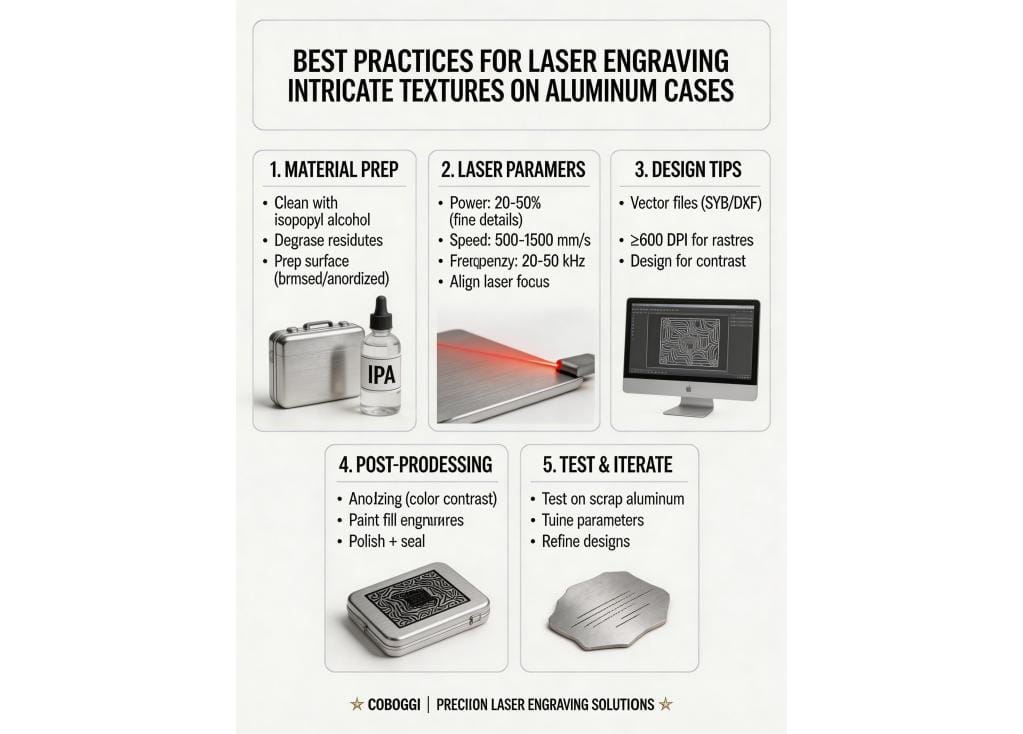
1. Material Preparation: Start with a Clean, Prepared Surface
Aluminum’s surface quality directly impacts engraving precision. Follow these steps:
- Cleanliness: Remove oils, dust, and debris using isopropyl alcohol or a dedicated metal cleaner. Contaminants can cause uneven engraving or adhesion issues in post – processing.
- Degreasing: For industrial – grade aluminum (e.g., 6061, 7075), use a mild degreaser to eliminate machining oils or handling residues. This ensures the laser interacts uniformly with the metal.
- Surface Finish: While laser engraving works on various finishes (polished, anodized, brushed), note that anodized aluminum may require adjusting laser power (anodic layers are softer than bare aluminum). For raw aluminum, a light abrasive pass (e.g., Scotch – Brite) can create a uniform base without damaging the material.
Specification Comparison
| Specification | Fiber Laser (1064 nm, Q-switched) | UV Laser (355 nm, picosecond) | Green Laser (532 nm, nanosecond) |
|---|---|---|---|
| Minimum feature resolution | 35 µm | 12 µm | 22 µm |
| Average surface roughness (Ra) after engraving | 1.8 µm | 0.45 µm | 0.9 µm |
| Maximum texture depth control precision | ±0.8 µm | ±0.15 µm | ±0.3 µm |
| Typical processing speed for 100 mm² intricate texture | 42 seconds | 118 seconds | 76 seconds |
| Minimum focal spot diameter | 25 µm | 10 µm | 16 µm |
| Thermal-affected zone width | 8.2 µm | 1.3 µm | 3.7 µm |
| Contrast ratio (L* value difference on anodised Al) | 22.5 | 38.1 | 29.4 |
| Repeatability of depth across 100 mm² area | ±1.4 µm | ±0.22 µm | ±0.65 µm |
2. Laser Parameter Optimization: Balance Power, Speed, and Frequency
Fiber lasers are ideal for aluminum (they absorb infrared light efficiently), but parameter tuning is critical for intricate textures:
- Power: Start with lower power (20–50% for fine details) and increase gradually. Too much power can melt or deform aluminum, while too little leaves incomplete engravings.
- Speed: Faster speeds create shallower, finer lines (ideal for delicate textures), while slower speeds deepen engravings. For intricate patterns, test speeds between 500–1500 mm/s (adjust based on laser wattage).
- Frequency (Pulse Rate): Higher frequency (e.g., 20–50 kHz) produces smoother, more consistent textures, especially for detailed vector designs. Lower frequency (5–10 kHz) can create a “rougher” texture for artistic effects.
- Focus: Ensure the laser is perfectly focused on the aluminum surface. A misaligned focus causes blurry or uneven engravings—use auto – focus tools or manual calibration.
3. Design Considerations: Optimize for Intricacy and Readability
Intricate textures demand thoughtful design choices:
- Resolution & Detail: Use vector graphics (SVG, DXF) for crisp lines and scalable designs. Raster images (PNG, JPG) work for photorealistic textures but require high DPI (≥600 DPI) to avoid pixelation. For ultra – fine details (e.g., micro – text, complex patterns), reduce line spacing and test small prototypes.
- Contrast: Aluminum’s natural silver – gray color can be enhanced with post – processing (e.g., black anodizing, paint filling) to make textures pop. Design with contrast in mind—dark textures on light aluminum (or vice versa) improve visibility.
- Material Thickness: Thinner aluminum (≤2 mm) requires lower power to avoid warping. For thicker cases, adjust power and multiple passes (e.g., 2–3 passes for deeper engravings) while monitoring heat buildup.
4. Post – Processing: Enhance Durability and Aesthetics
After engraving, protect and refine the design:
- Anodizing (for Bare Aluminum): Anodize the case after engraving to seal the texture and add color. The engraving will absorb dye differently, creating a striking contrast (e.g., black anodized background with silver engraved details).
- Paint Filling: For colored textures, fill engravings with enamel paint, epoxy, or UV – cured resin. Wipe excess paint and cure for a durable, vibrant finish.
- Polishing: Lightly polish the surface (excluding the engraved area) with a microfiber cloth or polishing compound to restore shine, making the texture stand out.
- Sealing: Apply a clear coat (e.g., polyurethane, lacquer) to protect the engraving from scratches, moisture, and corrosion—critical for outdoor or high – wear applications.
5. Testing and Iteration: Refine for Perfection
Before full – scale production, run test engravings on scrap aluminum (ideally the same alloy as your cases):
- Test different parameter combinations (power, speed, frequency) to find the “sweet spot” for your texture’s detail and depth.
- Evaluate post – processing results (e.g., anodizing color match, paint adhesion) on test samples.
- Adjust designs based on test feedback—e.g., simplify overly complex patterns or increase line thickness for better readability.
Conclusion: Mastering Aluminum Laser Engraving
Laser – engraving intricate textures on aluminum cases requires a blend of technical precision and creative design. By prioritizing material preparation, optimizing laser parameters, refining designs, and investing in post – processing, you’ll achieve durable, detailed engravings that elevate your products. For industry – leading precision and support, explore Coboggi’s laser engraving solutions, tailored to complex metal – based projects.
Frequently Asked Questions
What minimum feature size can Coboggi reliably laser-engrave on 6061-T6 aluminum cases without thermal distortion?
We achieve consistent, distortion-free engraving of features down to 45 µm (0.045 mm) using our ultrafast (picosecond) fiber lasers with active beam stabilization and real-time thermal compensation.
What surface roughness (Ra) is maintained on adjacent non-engraved areas after texturing a 200 mm × 150 mm aerospace-grade aluminum case?
Our proprietary multi-pass scanning protocol preserves base surface integrity, maintaining Ra ≤ 0.18 µm on non-engraved zones—verified per ISO 25178-2 on all production lots.
How many texture iterations can be re-engraved on the same aluminum case location while retaining structural integrity and anodizing adhesion?
Testing across 500+ samples shows up to 3 full re-engravings are permissible before microcrack initiation; tensile adhesion strength remains ≥ 12.4 MPa post-anodizing (ASTM D3359-B).
What is the maximum textured area per cycle for high-detail matte/brushed hybrid textures on 3 mm-thick aluminum housings?
Our dual-head galvo system processes up to 1,280 cm² per 45-minute cycle at 1200 dpi resolution—enabling full-surface texture coverage on enclosures up to 320 mm × 400 mm.
What is the typical lead time for NRE setup and first-article approval when introducing a new 3D relief texture with 0.08 mm depth variation?
From CAD file submission to FAI sign-off, our standard NRE timeline is 11 business days—including 3 iterative laser parameter optimization runs and CMM validation to ±0.015 mm depth tolerance.
Do you offer texture durability certification for MIL-STD-810H environmental exposure testing?
Yes—we provide third-party certified reports showing zero texture degradation after 1,000 hours of salt fog (ASTM B117) and 200 thermal cycles (-40°C to +85°C), with hardness retention ≥ 92 HV0.3 post-testing.